mirror of
https://github.com/snltty/linker.git
synced 2026-03-22 05:50:50 +08:00

97 lines
5.3 KiB
Markdown
97 lines
5.3 KiB
Markdown
|
||
<!--
|
||
* @Author: snltty
|
||
* @Date: 2021-08-22 14:09:03
|
||
* @LastEditors: snltty
|
||
* @LastEditTime: 2022-11-21 16:36:26
|
||
* @version: v1.0.0
|
||
* @Descripttion: 功能说明
|
||
* @FilePath: \client.service.ui.webd:\desktop\linker\README.md
|
||
-->
|
||
<div align="center">
|
||
<p><img src="./readme/logo.png" height="240"></p>
|
||
|
||
# Linker
|
||
|
||
让你那些散落在世界各地的联网设备就像在隔壁房间一样轻松访问。
|
||
|
||
[](https://github.com/snltty/linker)
|
||
[](https://github.com/snltty/linker)
|
||
[](https://hub.docker.com/r/snltty/linker-musl)
|
||
|
||
[](https://github.com/snltty/linker/releases)
|
||
[](https://mit-license.org/)
|
||
[](https://github.com/snltty/linker)
|
||
[](https://github.com/snltty/linker)
|
||
|
||
|
||
<a href="https://linker.snltty.com">官方网站</a>、<a href="https://linker-doc.snltty.com">使用说明文档</a>、<a href="https://jq.qq.com/?_wv=1027&k=ucoIVfz4" target="_blank">加入组织:1121552990</a>
|
||
|
||
<p><img src="./readme/like.png"></p>
|
||
|
||
</div>
|
||
|
||
|
||
## [🎖️]主要功能
|
||
|
||
### 1、私有部署
|
||
- **私有部署:** 得益于各位老板的支持,官方提供了500Mbps+的公开服务器,还有一些免费中继节点,但会有所限制,建议私有部署属于你自己的服务器。
|
||
- **多平台支持:** 支持'Windows'、'Linux'、'Android'、'Docker'、'OpenWrt'、'NAS'、'PVE'、'LXC'、'macOS',对于ios,我没有苹果手机,没有开发者账号,暂时不支持。
|
||
|
||
### 2、打洞中继
|
||
|
||
这些是隧道连接方式。
|
||
|
||
- **打洞连接:** 支持`TCP、UDP、IPV4、IPV6`,内含多种打洞方法,总有一个适合你。
|
||
- **中继连接:** 支持多中继节点,承载海量设备,在[官网](https://linker.snltty.com)展示了一些官方公开服务器的中继节点信息。
|
||
|
||
### 3、通信方式
|
||
|
||
这些是在隧道建立后,客户端之间访问实际业务的通信方式。
|
||
|
||
- **异地组网:** 使用虚拟网卡实现`点对点`、`点对网`、`网对网`,可`自动分配虚拟IP`。
|
||
- **端口转发:** 在无法使用虚拟网卡,或者不想使用虚拟网卡的时候,可以使用一对一端口转发实现相互访问,相关说明请查看[《关于单隧道实现多服务访问的端口转发状态管理的研究》](https://blog.snltty.com/2025/10/01/forward/)。
|
||
- **Socks5:** 区别于端口转发,端口转发两端一一对应,需要指定端口,而Socks5代理可以代理所有端口,实现类似于点对网的效果。
|
||
|
||
### 4、特色功能
|
||
|
||
一些别人可能没有的,比较特色的创新功能。
|
||
|
||
- **TCP over TCP:** 在tcp over tcp下,使用<a href="https://github.com/snltty/tun324">tun324</a>为通信提速,相关说明请查看[《关于TUN虚拟网卡内重定向实现TCP/IP三层转四层代理的技术原理研究》](https://blog.snltty.com/2025/09/27/tun2proxy/)。
|
||
- **网段映射:** 对于家庭网络,一般使用192.168.1.0/24这样的网段,这样多个设备之间难免冲突,网段映射可以很好的解决这个问题。
|
||
- **应用层NAT:** 默认使用`iptables`、`NetNat`建立NAT实现点/网点对网。在无法使用系统内置NAT的情况下,应用层NAT闪亮登场。
|
||
- **应用层防火墙:** 内置了防火墙功能,应用于虚拟网卡、端口转发、Socks5等通信功能,可以精细控制客户端的访问权限,例如只允许A访问B的3389,其它客户端无法访问。
|
||
- **远程唤醒:** 可以通过`WOL魔术包、USB COM继电器、USB HID继电器`远程唤醒局域网内的设备
|
||
- **内网穿透:** 类似于FRP,使用端口或域名通过服务器访问内网服务(支持`计划任务`,定时定长自动开启关闭,例如每天在上9点自动开启穿透,1小时后自动关闭穿透)。
|
||
|
||
|
||
## [🖼️]管理页面
|
||
|
||
客户端监听1804,HTTP+Websocket,对客户端进行日常管理。
|
||
|
||
<p><img src="./readme/home.png"></p>
|
||
|
||
|
||
## [🎁]为爱发电
|
||
|
||
若此项目对您有用,可以考虑对作者稍加支持,让作者更有动力,在项目上投入更多时间和精力
|
||
|
||
爱发电订单号可用于解锁官方服务器的中继带宽,善款将用于数字签名证书,望支持。
|
||
|
||
[](https://afdian.com/a/snltty)
|
||
|
||
使用 **[🔋为爱发电](https://afdian.com/a/snltty)**、或
|
||
|
||

|
||
|
||
## [👏]特别说明
|
||
|
||
[](https://github.com/snltty/linker/graphs/contributors)
|
||
|
||
已加入[DotNetGuide](https://github.com/YSGStudyHards/DotNetGuide)列表、已加入[dotNET China](https://gitee.com/dotnetchina) 组织、
|
||
<img src="https://images.gitee.com/uploads/images/2021/0324/120117_2da9922c_416720.png" height="20">
|
||
|
||
[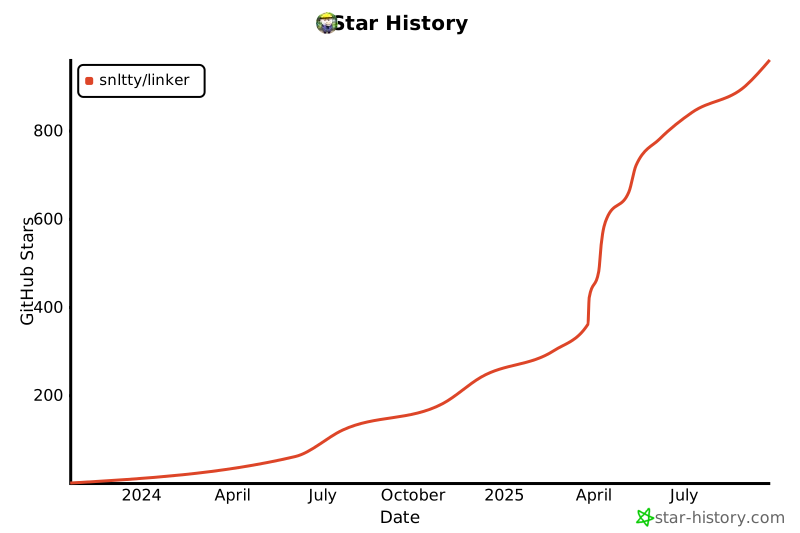](https://www.star-history.com/#snltty/linker&Date)
|
||
|
||
|